
 >">
>"> >">
>"> >">
>">Welcome to the Lumines Arise Community Guide!
This is a guide to basic knowledge of Lumines as well as the specifics in different game modes of Lumines Arise, designed for players of all skill levels to improve.
Basics Tutorial
1. Forming 2×2 Squares
To play Lumines, you will move and rotate 2×2 blocks made up of two colors/types, aiming to create 2×2 (or larger) Squares of a single type.

2. The Timeline Sweep
A Timeline sweeps across the playfield to the beat of the music, clearing completed Squares and generating points and progress based on how many 2×2 Squares can fit in the cleared area.

3. Combo Bonuses
What is a Combo?
To earn a Combo, clear an area containing four or more 2×2 Squares within a single Timeline pass.

How do I maintain Combo bonuses? (Credit: Yokta Stone)
If you’re going for a high score, holding onto the combo multiplier is of absolute importance. Continue to clear four or more squares in each sweep to keep the combo going!
So if you already have four squares to the right of the timeline, you have a choice to make: start building squares to the left in preparation for the next sweep, or keep building up the squares in the current stack to squeeze more points out of the current sweep.
The ideal move depends on a lot of factors: your upcoming pieces, the state of the field, your average actions-per-minute, and the timeline’s speed, among others. With only a split second to consider your move, it can be tough to intuit. If you’re not confident, play it safe and focus on meeting that 4-square quota.
4. Chain Blocks
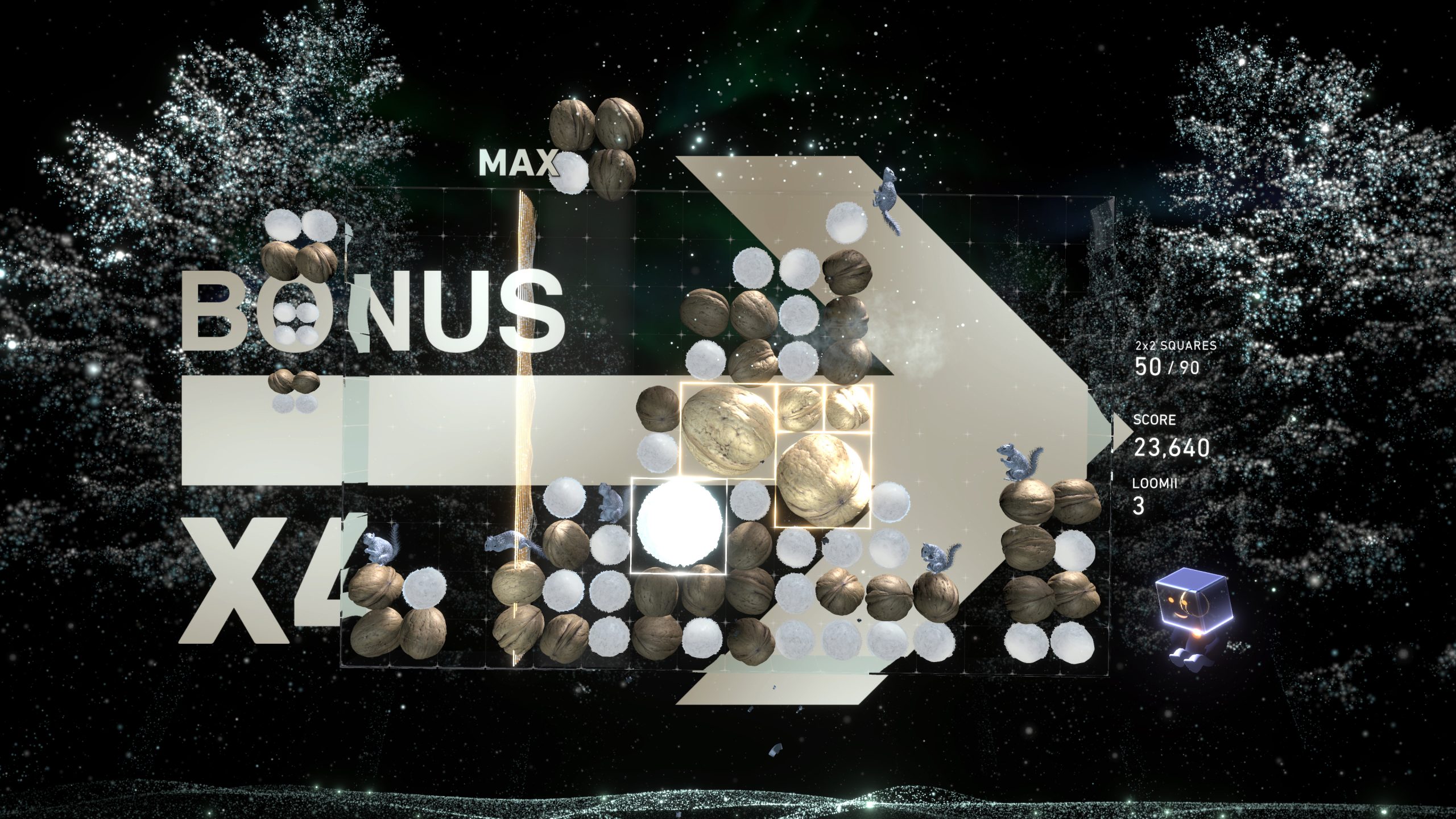
Chain Blocks can be used to link all adjacent blocks of the same color. The “chains” that are formed will be cleared when the Timeline passes over them.

5. Burst Mode
Burst is an all new mechanic featured in Lumines Arise!
What is Burst?
As you play, a percentage meter (marked with “%”) at the top of the Timeline will increase. When it gets above 50 (and up to the MAX at 100), you can hit the trigger buttons to activate Burst.
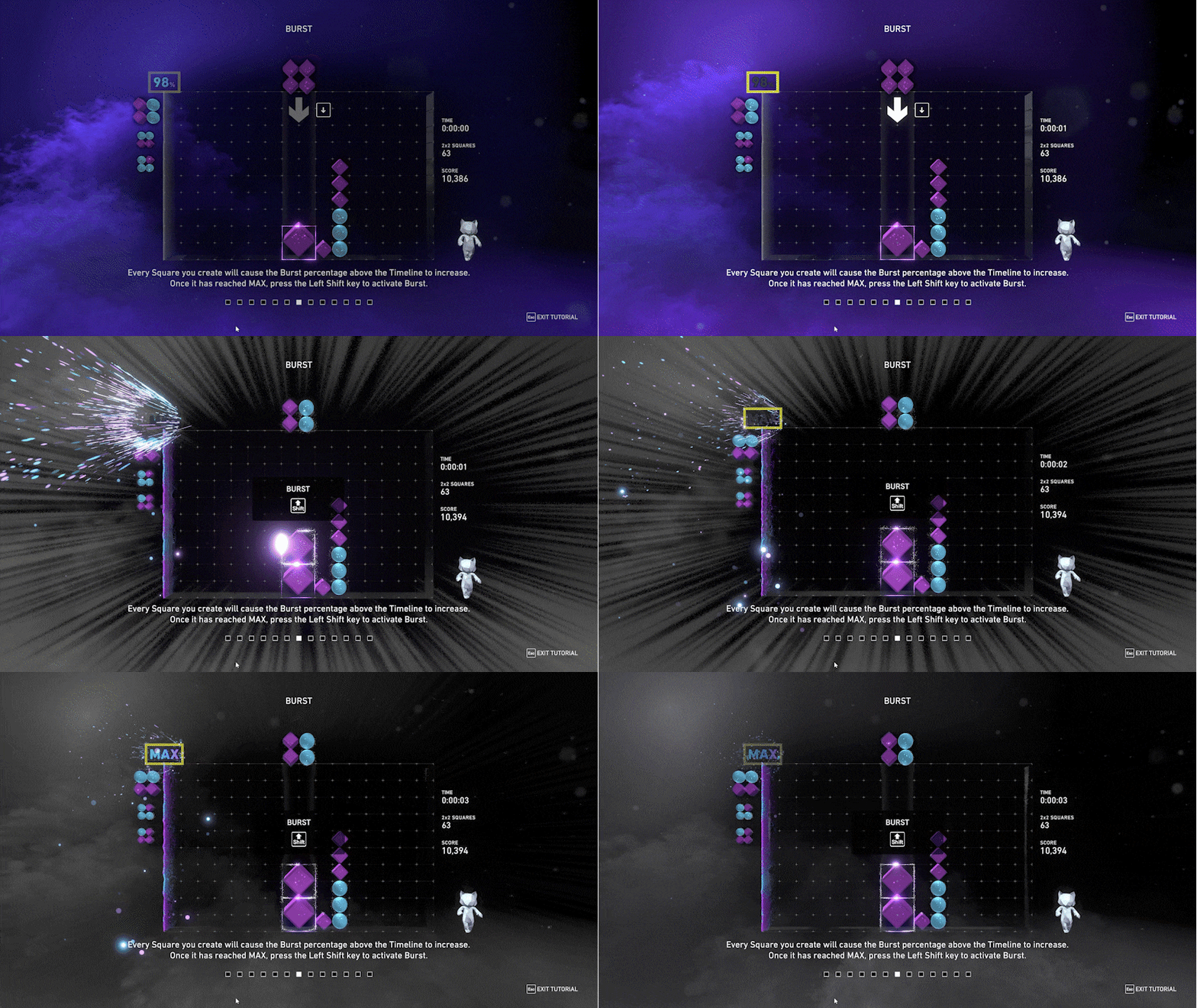
When activated, the game enters a temporary state where Squares formed in one of the two colors won’t clear for a short period. The number above the Timeline now indicates how many passes you have left before it starts clearing the Burst color—the larger the % you had before you activated Burst (between 50% and MAX), the more passes you get.
During Burst, Look for the largest Square cluster with the numbered Burst over them; your job now is to grow that block as large as possible by placing like-colored blocks adjacent to it. Add blocks to the top of the cluster, to the side of the cluster – anywhere and everywhere that touches it! Blocks of the opposite color that are touching or above the Burst cluster will shoot off the top of the screen at regular intervals as you do this, making it possible to further increase the size of your Burst cluster.

When the last Timeline pass is over, Burst will end, and the final Timeline sweep will cross the screen and clear everything. Opposite-color blocks that flew off the top of the screen will then fall back onto the playfield, creating additional Combos.

Beginner Tips
1. 60-Second Time Attack
The 60-second Time Attack game mode is a great place to gauge your skill level. It’s found in the Multiplayer Hub’s Leaderboard League. Play as fast as you can from instinct to make those 2×2 Squares without worrying about misdrops. Then repeat and see if you can do it faster. Go back to the 60-second Time Attack every so often to gauge your progress.

2. Play around the Timeline
Let’s look at the Timeline a bit differently. When you start playing, you may be making Squares on or just ahead of it.
Shift that thought to making Squares around the Timeline. What does that mean? When the Timeline is halfway across the screen or more, start making matches BEHIND it (to the left). Work your way to the right as the Timeline completes a lap, and then do it again. This gives you the most amount of time to make larger matches that’ll hopefully even sustain a combo!
Practice this school of thought on stages with a slower tempo as the timeline sweeps across the playfield slower, then see if you can keep up with the more upbeat stages!

3. Use Burst
One way to avoid topping out or getting a game over is by using your Burst. Don’t be afraid to use it! And once you’re in, concentrate on making that Burst match as large as possible, which is the Square with the flashing Burst number. If you use Burst with a nearly full playfield, it’s easier to clear a larger area.

4. Enter Burst Rush
Get the feel for what using Burst feels like by going to Missions, Challenges, and playing Burst Rush. This Challenge, in particular, guides you through getting a huge Burst even if you have struggled to do it in other modes. It’s a two-minute Challenge but over time, modifiers start to favor one color over the other, and you’re given larger and larger blocks. See if you can get an over 300 Burst in one go—we bet you can.

5. Quick Burst
A great way to practice using Burst is Quick Burst. Located in the Multiplayer Hub, it’s a daily challenge to see how large a Burst you can get. Hop in, fill the center of the playfield with garbage first, and then go into Burst. Use some of what you saw in the Burst Rush Challenge to get the largest Burst you can. Repeat as needed and see if you can best your score!

6. Watch the CPU Play
Go into Playlist mode, and start a game in Theater mode. Here, you can watch the CPU play, adjusting its speed and gameplay focus (Square, combo, or Move-oriented). You can turn off Burst, too, if you just want to see how the CPU does without it. As it plays, think about how to incorporate some of what it’s doing into your own play style.

7. Training Missions
Inside Missions you’ll find 60 Training Missions that will help you get used to using every kind of block in various scenarios you might encounter. They’re repeatable, easy to restart when you fail, and will show you some more advanced ways to think about block placement and Timeline management than just playing Journey over and over.

